LUNEV Software · Web development in Cologne
Software that keeps the promises its interface makes.
Websites, web applications and apps from Cologne for small and medium-sized businesses and the self-employed. Design and programming under one roof.
Situations8 situations
Sound familiar?
“Our processes run on spreadsheets, email and scraps of paper.”
What helps
A web application where everyone works with the same data.
“Our website is slow and a pain to use on a phone.”
What helps
A fast website that works well on a phone too.
“We need an app for our customers but don’t know where to start.”
What helps
First a clickable prototype, then the iPhone app.
“Our software has grown over the years, and nobody dares to touch it anymore.”
What helps
Clean it up, secure it and modernize it step by step, without downtime.
“Off-the-shelf software doesn’t fit the way we work.”
What helps
Software that follows your processes, not the other way around.
“We use several tools that don’t talk to each other.”
What helps
Connecting your programs so you enter data only once.
“The interface looks dated, and users can’t find their way around.”
What helps
A clear interface that guides people well.
“We have an idea but no sense of how much work it would take.”
Book a first callWhat helps
A short conversation, a quote with an honest estimate, then a clickable draft.
Services8 services
What LUNEV Software builds
Each service says what you end up with. If you want to know more, the technical details are underneath.
Situation“Our website doesn’t show what we can do.”
Websites
A website that shows what you offer, loads fast and works on every device.
LUNEV Software works out with you what belongs on the website, then designs and builds it, in several languages if you like. On request, running and maintaining it after launch is part of the job too.
- What you get
- A clickable draft before any code is written
- The finished website, ready for launch
- The source code, with all rights of use to the code written for you once paid in full
- Instructions for changes and operation
Situation“Our processes run on spreadsheets, email and scraps of paper.”
Web applications
A program in the browser that fits your workflow and holds up in daily work, not just in a demo.
Before anything is built, what the program has to do is clarified with you. Then the interface and everything behind it are built in-house, from the first draft to launch. You try out interim versions early in the browser. LUNEV Software also builds its own bookkeeping app Quitt for your business: in your design and under your name, running on your own subdomain.
- What you get
- A clickable draft before any code is written
- The finished application, ready for use
- The source code, with all rights of use to the code written for you once paid in full
- Instructions for operation and further development
Situation“We need an app but don’t know where to start.”
Apps for iPhone
A finished iPhone app, ready for the App Store.
Before anything is built, what the app has to do is clarified with you. Then it is designed and built, and LUNEV Software sees it through to release. You try out interim versions on real devices.
- What you get
- A clickable draft before any code is written
- The finished app, ready for the App Store
- The source code, with all rights of use to the code written for you once paid in full
- Instructions for release and further development
Situation“Off-the-shelf software doesn’t fit the way we work.”
Custom software
Software that reliably handles a clearly defined workflow.
Some workflows don’t fit any ready-made product: an internal tool, a link between two programs that don’t talk to each other today, or an app that uses data from the device. For these, lean software is built: you get what the workflow needs, and nothing more.
- What you get
- A description of the workflow before any code is written
- The finished software, as a web interface or an iPhone app, depending on use
- The source code, with all rights of use to the code written for you once paid in full
- A handover with instructions for operation and updates
Situation“Our customers should be able to pay us online, right on our site.”
Online payments
Your customers pay on your site, without a detour through someone else’s payment form. An order only counts as paid once the payment provider has confirmed it.
LUNEV Software connects payments through Stripe or Mollie: credit cards and, if you like, PayPal, Klarna, Apple Pay and Google Pay. The payment page, confirmation and thank-you page are designed to match your website. Customers enter card details right on your site; only PayPal and Klarna briefly ask them to confirm with the provider. First, who pays what and when is worked out with you, whether in a shop, for a booking or as a subscription.
- What you get
- A clickable draft of the payment page before any code is written
- Payments built into your website or application, with the payment methods you choose
- Confirmation emails to your customers
- The source code, with all rights of use to the code written for you once paid in full
- Instructions for refunds, new payment methods and operation
Situation“The interface looks dated.”
Interfaces and usability
An interface that behaves the same everywhere and that everyone can use, even without a mouse.
Between a good design and a good interface lies a lot of craft: what happens while loading, on errors, on small screens, with the keyboard? LUNEV Software makes sure every part is thought through and behaves consistently. Transitions and animations are only used where they show what is happening. If you like, the design is created as well.
- What you get
- Building blocks for your interface that look and behave the same everywhere
- An overview with examples for each building block
- A test report on legibility and use without a mouse
- What quality looks like
- Every building block works without a mouse.
- Colours are calculated for legibility, not estimated.
Technical details
Designs become components and design tokens that behave consistently and can be extended: states, focus, keyboard support and accessibility on every screen.
- Deliverables
- Design tokens as CSS custom properties
- Components with every state: default, hover, focus, disabled, error, empty
- Documentation with examples for each component
- Test report on contrast and keyboard use
- Structure
- Interface
- LayoutComponentsTypographyForms
- Interaction
- StatesMotionKeyboardAccessibility
- Delivery
- Playwright
Situation“Our website is slow and a pain to use on a phone.”
Fast loading
A faster site and a report that uses the same measurement before and after to show what has improved.
Waiting is part of using a site, even though no mockup shows it. LUNEV Software measures how fast your site loads and responds, finds the causes and fixes them. What you get at the end are values from the same measurement, not estimates.
- What you get
- A report on how fast the site is before and after
- A list of causes, most important first
- The improvements, built in
- Limits for load time, so the site stays fast
- What quality looks like
- Every improvement is measured the same way as the baseline.
- The limits live in the project and can be checked at any time.
Technical details
Load time, responsiveness and script size are measured under fixed conditions; the causes are tracked down in the code and fixed. Limits for future changes can be checked against the build with one command.
- Deliverables
- Measurement report with device profile and conditions
- List of causes, ordered by impact
- Changes as traceable commits
- Structure
- Interface
- Typography
- Interaction
- Motion
- Application
- Routing
- Data/API
- REST
- Delivery
- BuildMeasurement
Measuring line: measured across all layers
- Technologies
Situation“We have an idea but no sense of how much work it would take.”
Prototypes
A prototype you can use like the future product, and a list of the questions it has answered.
Some questions only a prototype can answer, such as whether a workflow makes sense or an idea holds up. It works like the future product, without its cost. What proves itself becomes the foundation; what doesn’t has cost little.
- What you get
- A prototype to try out at its own address
- Sample data instead of real connections
- A list of answered and open questions
- A recommendation on what goes into the product
- What quality looks like
- The prototype runs on your users’ devices, not just on the developer’s computer.
- It’s clearly marked as a prototype, so nobody mistakes it for the finished product.
Technical details
Prototypes are built in the browser and behave like the future product, but work with sample data instead of real APIs.
- Deliverables
- Usable prototype at a preview URL
- Sample data instead of real APIs
- Structure
- Interface
- LayoutComponentsForms
- Interaction
- States
- Application
- Routing
Dashed: provisional
- Technologies
Security5 points
Secure from the start
Your data and your customers’ data must be protected. That is why security is planned in from the beginning, not at the end. It is also how LUNEV Software runs its own projects.
Encrypted in transit
Every request is encrypted. What travels between your users and the server stays protected from prying eyes.
Not open to the internet
The website and its services cannot be reached directly from the internet. Requests run through a protected tunnel, and administration is additionally secured with a separate login.
Only what is needed
No tracking and no advertising services. This site loads no third-party content on its own. What is never collected cannot be lost.
Backed up and reversible
Every update keeps the previous version. If something goes wrong, it is back in one step.
Covered by tests
In Trade Studio, dedicated automated tests cover sign-in, sessions and access control, so it can be checked that they work.
Process4 steps
How a project works
Conversation
The conversation clarifies your situation, your goal and the scope. Afterwards you receive a written quote.
Draft
You see a clickable draft early and base your decisions on it before any code is written. The draft is included in the quote.
Build
The work proceeds in stages, and you decide what comes next based on working builds.
Operation
On request, LUNEV Software looks after your software after launch and keeps developing it.
Studio6 principles
Small on purpose
Whoever says yes also does the work.
There is no handover between the commitment and the work. That keeps communication direct and responsibility clear.
Data sheet
- Size
- Very small.
- Way of working
- Short steps, visible progress, milestones you can try out.
- Location
- Cologne
- Languages
- German and English; websites and apps multilingual if needed
- Reference
- This website: loads quickly, works on phones, uses no tracking, is bilingual and can be used by keyboard.See it (Work entry “This website”)
In brief
LUNEV Software in Cologne plans and builds websites, web applications and apps for small and medium-sized businesses and the self-employed. The work covers web design and web development, web applications in the browser, app development for iPhone and software development for processes no off-the-shelf program covers, plus online payments with Stripe or Mollie, interfaces, faster loading and prototypes. Design and programming happen under one roof, and there is no handover between the commitment and the work. The first conversation is free and without obligation, and LUNEV Software replies to enquiries within two business days. A written quote with a fixed price follows, calculated at €75 per hour (final price, no VAT under the German small business rule, § 19 UStG). Before any code is written, you see a clickable draft that is included in the quote. Once you have paid in full, you receive the source code and all rights of use to the code written for you. LUNEV Software is new, and its first projects are its own: the trading journal Trade Studio, the bookkeeping app Quitt and the iPhone app StrideNow, which is coming soon.
Work4 entries
What exists so far
LUNEV Software is new. You can already take a look at Trade Studio, a trading journal at trade-studio.de, Quitt, the studio’s own bookkeeping app at quitt.lunev-software.de, and this website. StrideNow, an iPhone app for nutrition and training, is coming soon.
Trade Studio
Own projectWeb application · 2026Web application2026Own projectOwn project. Not a client commission.
Trade Studio is a trading journal: accounts, trades, payouts and transactions with screenshots in one place, plus analytics, a position size calculator and market news. It runs at trade-studio.de(external site, opens in a new tab) and can be installed on an iPhone like an app.
Result
- Publicly live at trade-studio.de, on a computer and on a phone.
- Each account sees only its own data.
Technical measurements
- Backend tests on 1 October 2026 (
npm test, in an empty test folder, never against real data): 396 of 396 passed. - JavaScript at start according to the build of 1 October 2026: 176.3 KB gzip, budget 200 KB. If the budget is exceeded, the build fails.
- Every build first checks formatting, types, lint, translation files and licenses and stops at any error.
Screenshots
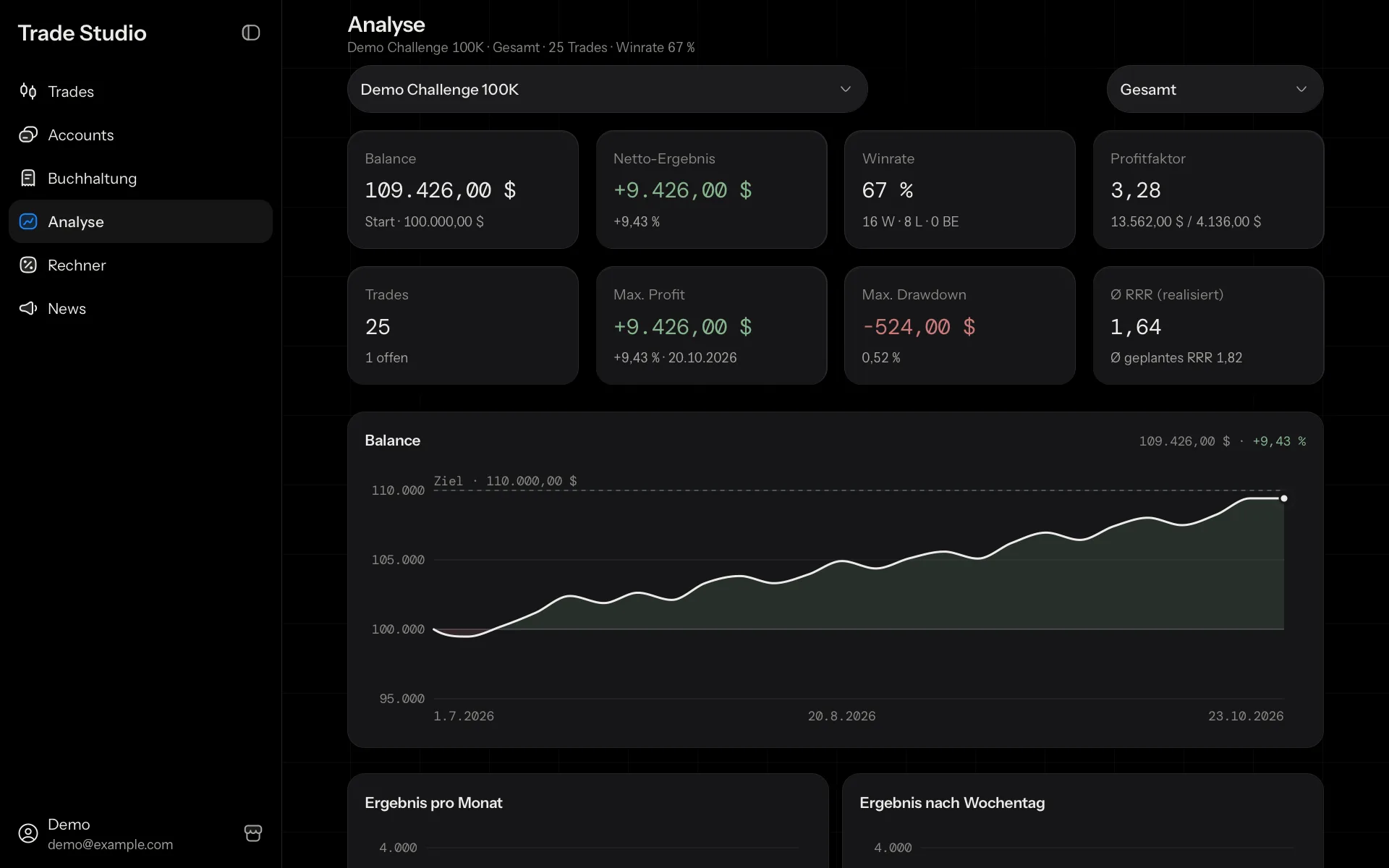
Analytics · 1280 px · demo data · German version 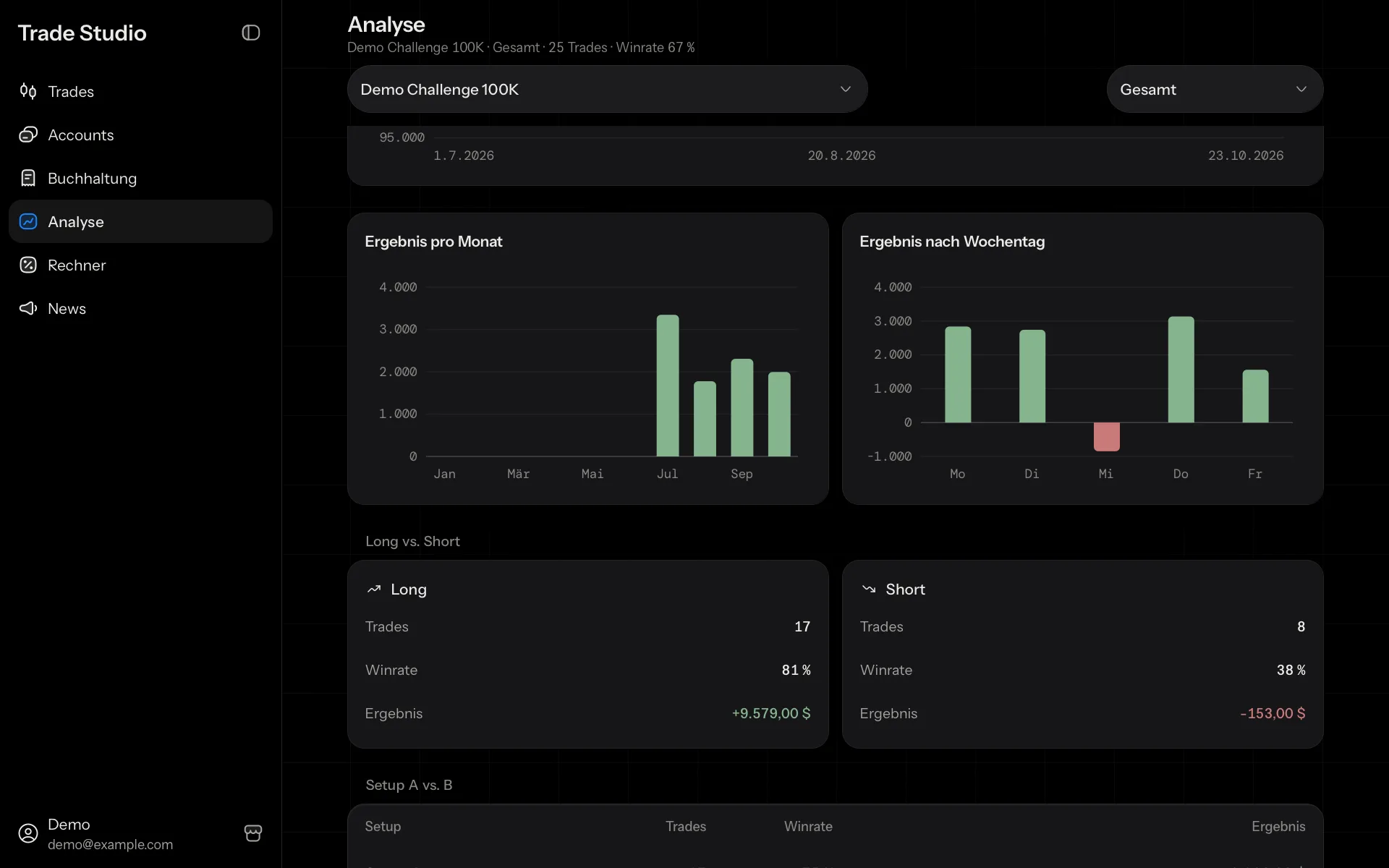
Analysis · 1280 px · demo data · German version 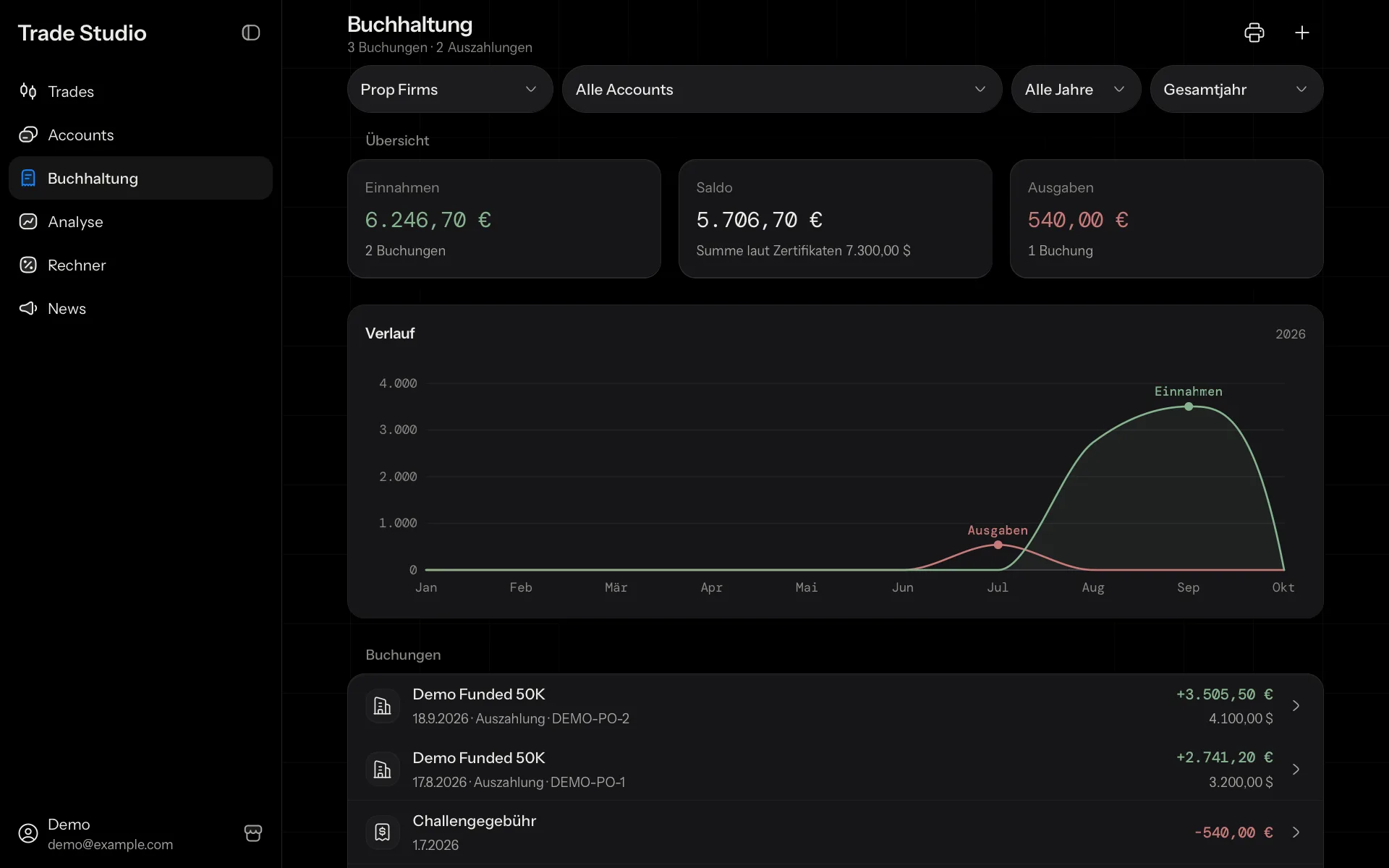
Bookkeeping · 1280 px · demo data · German version 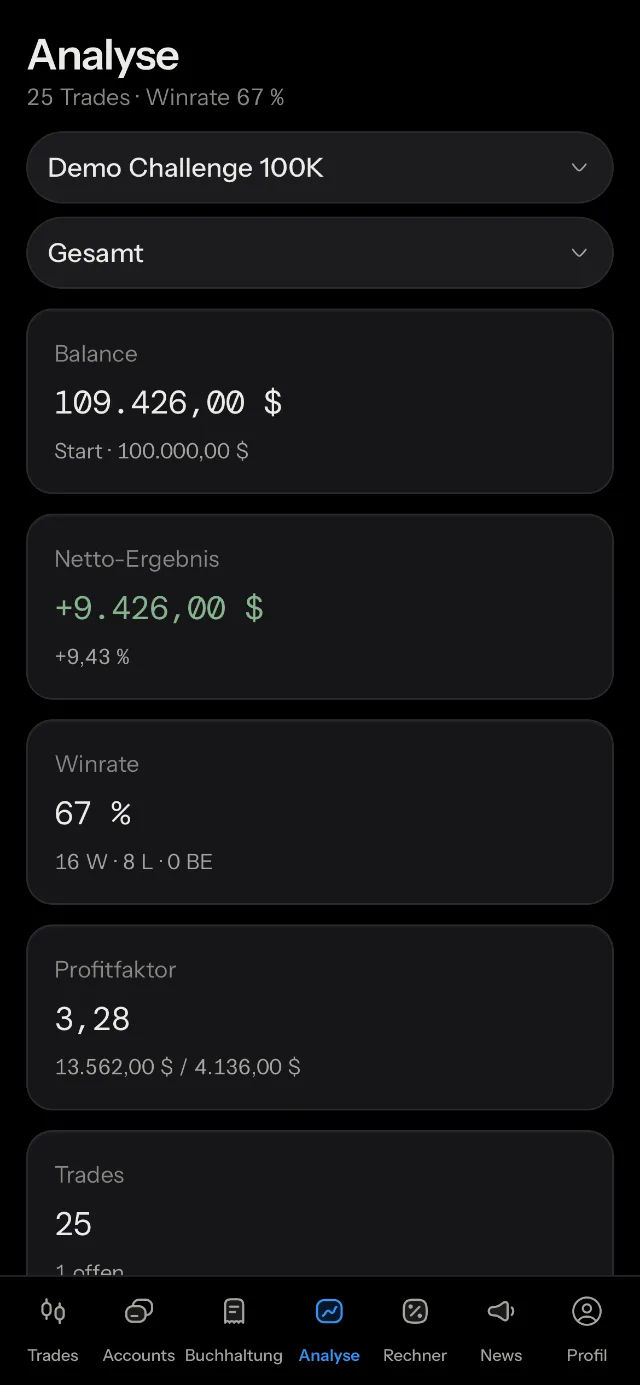
iPhone format · 390 px · demo data · German version - Year
- 2026
- Type
- Own project
Starting point
A trading journal holds private financial data: balances, results, payouts. It has to assign that data safely to each account, protect sign-ins and work on a phone just as well as at a desk.
Approach
A web client in Vue and Vite and a custom Node.js server with SQLite that needs no packages besides Node and serves the web app from the same process. The server assigns every record to the signed-in account itself and ignores any such field in the request. It runs on a rented Linux server behind Cloudflare Tunnel.
Security
- Passwords are stored only as scrypt hashes with their own salt and compared in constant time (
timingSafeEqual). - The session cookie
__Host-sessionis HttpOnly, Secure and SameSite=Lax. Only a hash of the session key is stored, never the key itself. - For Google sign-in the server verifies the ID token itself: signature, audience, issuer, expiry and verified email address.
- Requests are rate-limited per IP, failed password checks also per address. Every failed sign-in gets the same answer and doesn’t reveal whether an account exists.
- Each account sees only its own records. IDs from other accounts get a 404, as if they didn’t exist.
Quitt
Own projectBookkeeping app · 2026Bookkeeping app2026Own projectOwn project. Not a client commission.
Quitt is LUNEV Software’s own bookkeeping app, built for sole proprietors in Germany who use cash-basis accounting (EÜR), including small businesses exempt from VAT. It covers income and expenses with receipts, the business share in percent, assets with depreciation (AfA), invoices as PDF, bank statement import, the figures of the Anlage EÜR for transfer to ELSTER and a DATEV export. Several clients are kept strictly apart. On an iPhone, Quitt can be installed like an app, and you photograph receipts with the camera. Quitt runs at quitt.lunev-software.de(external site, opens in a new tab) and has no public demo: you request an account and LUNEV Software activates it. Quitt is also available for other businesses: in their design and under their name, running on their own subdomain. Features, who it is for and accounts on request are on the product page.
Result
Not measured yet. Values will appear here only after a documented measurement.
Screenshots
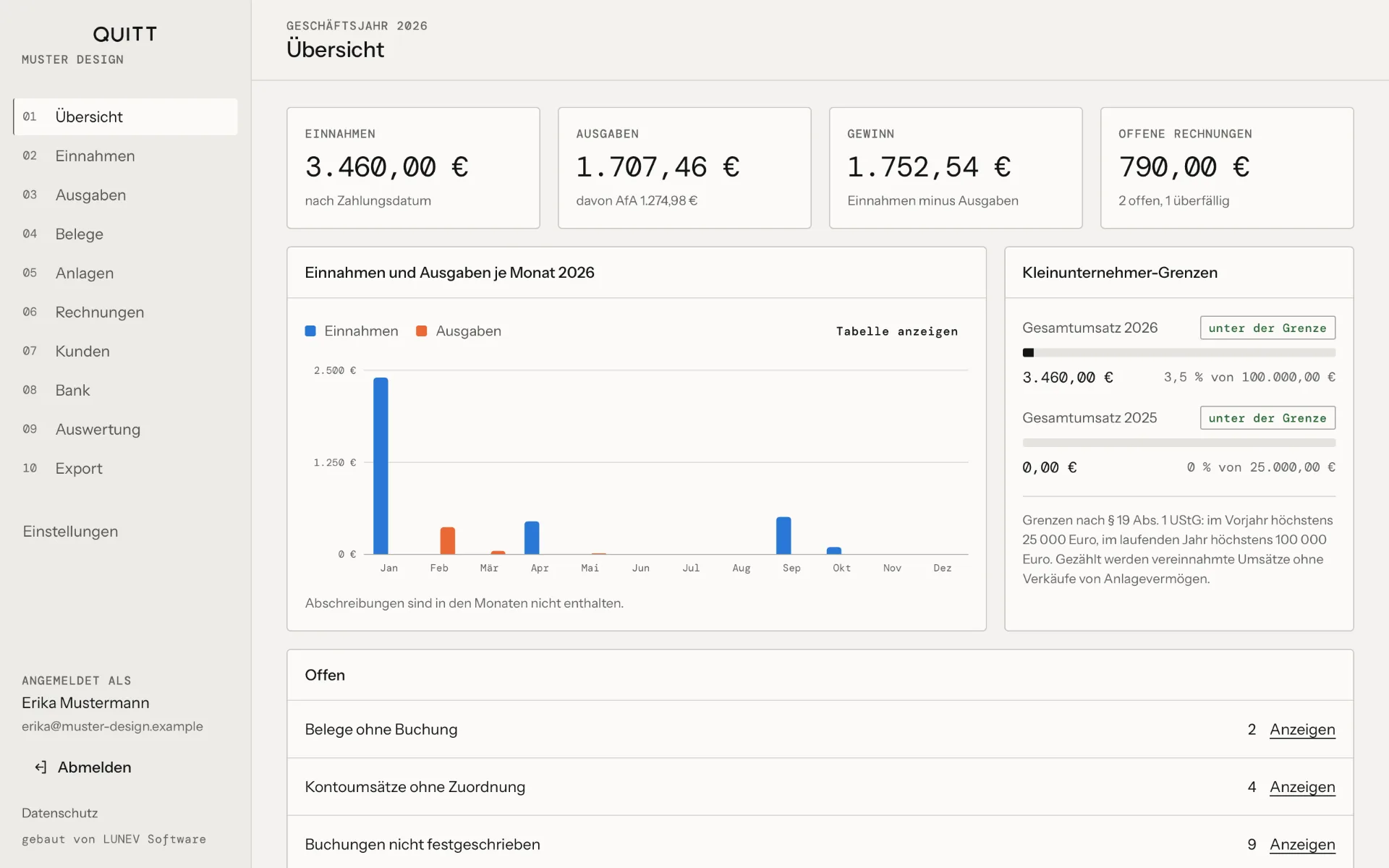
Overview · 1280 px · demo data · German version 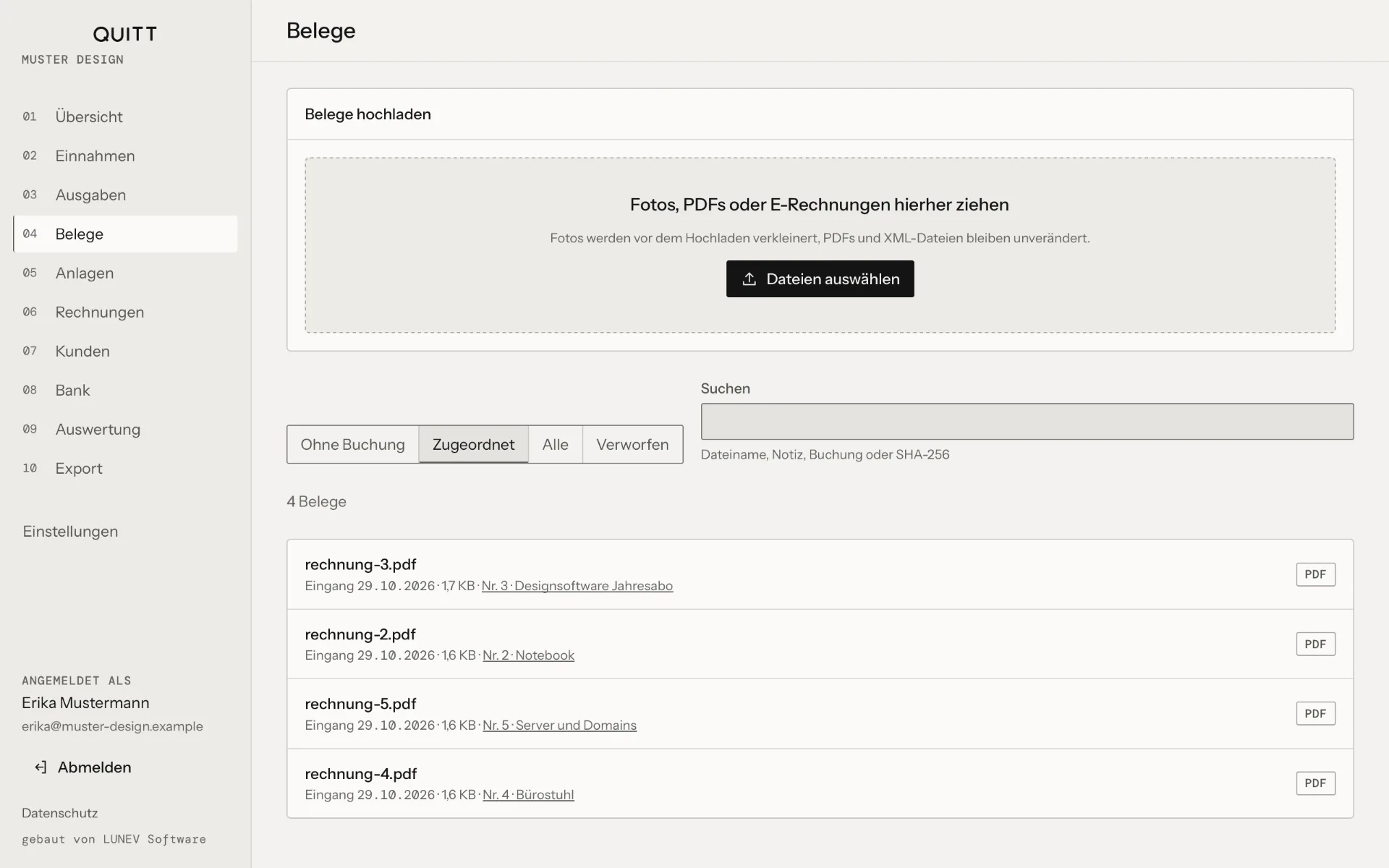
Receipts · 1280 px · demo data · German version 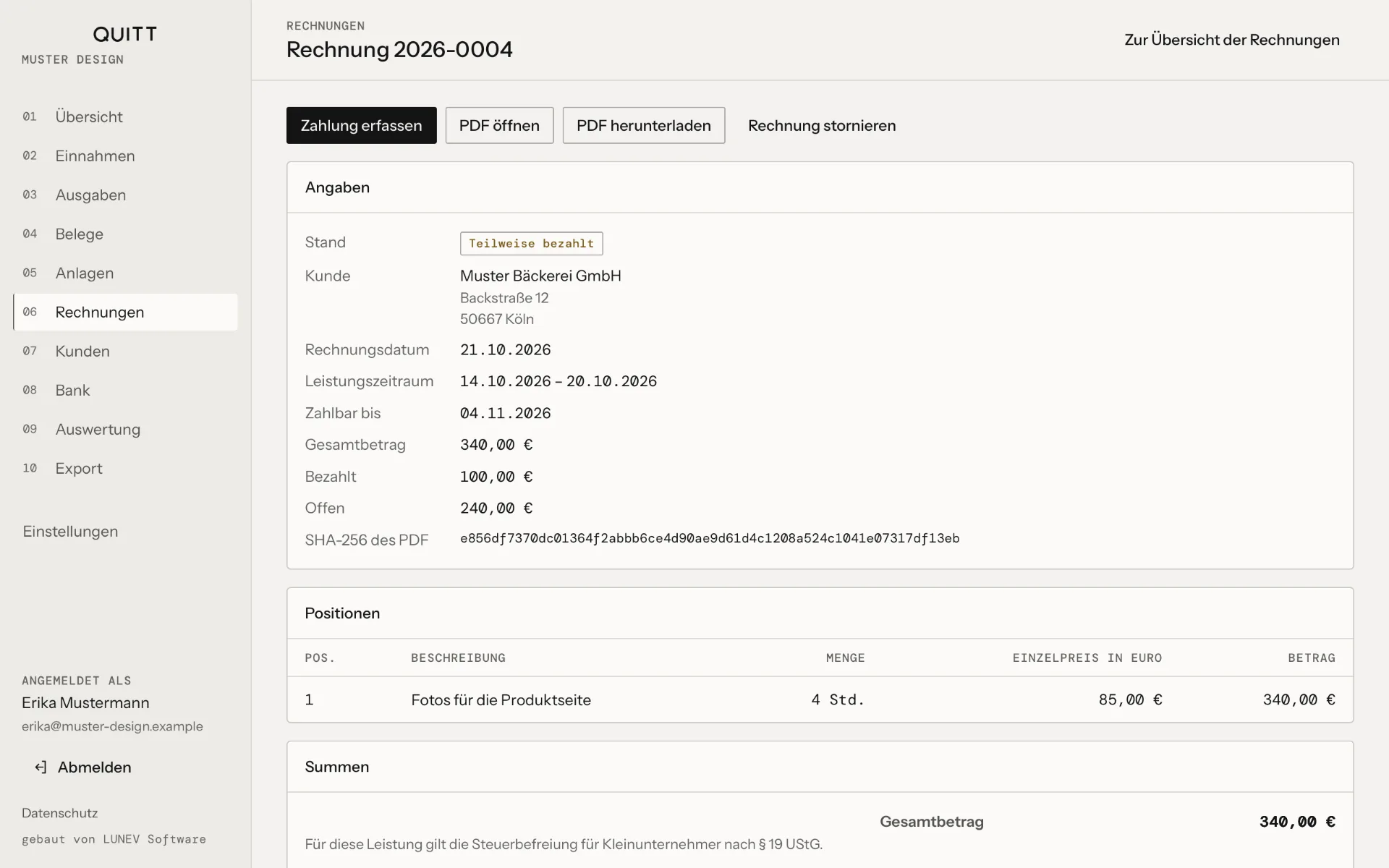
Invoice · 1280 px · demo data · German version 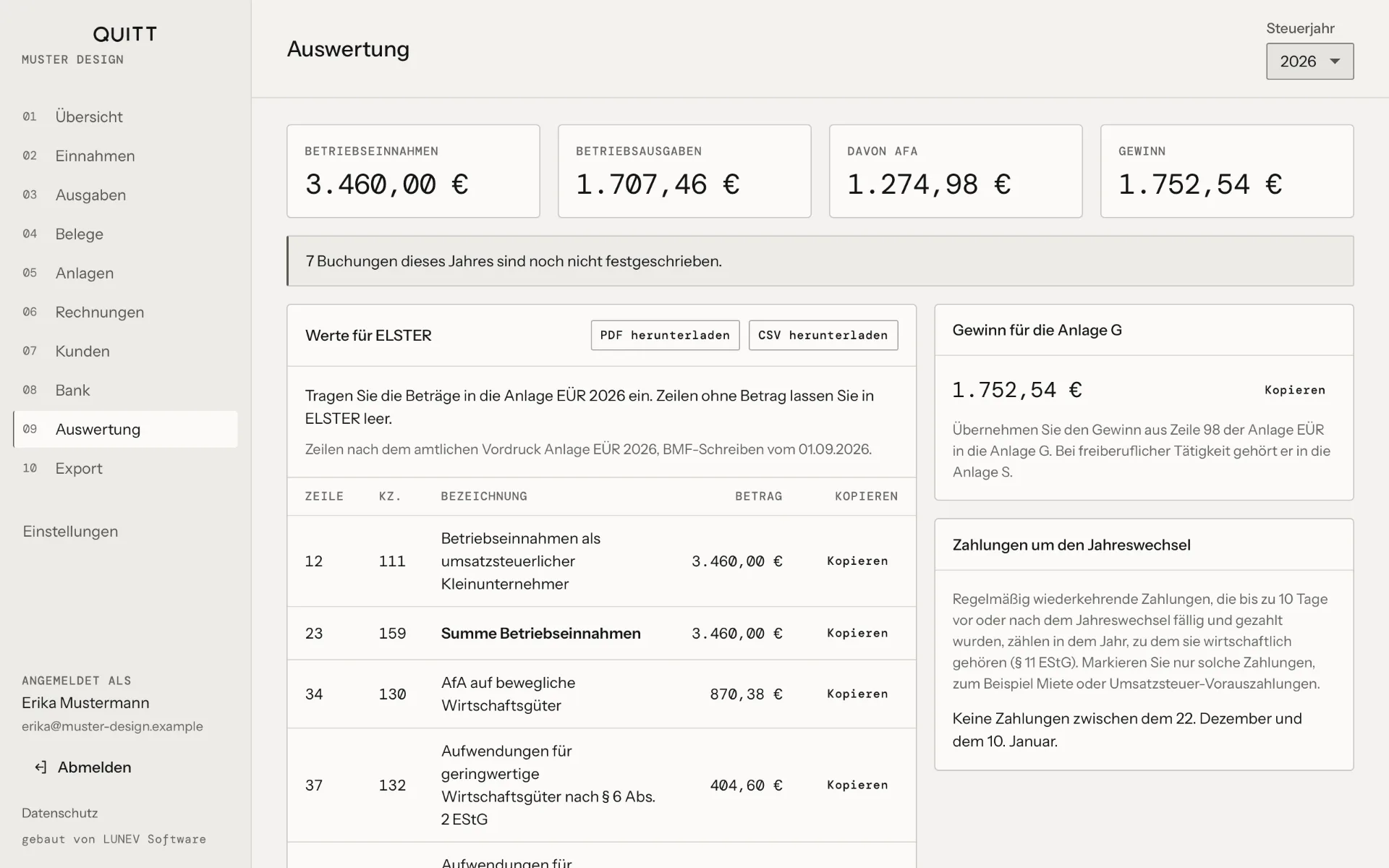
EÜR report · 1280 px · demo data · German version 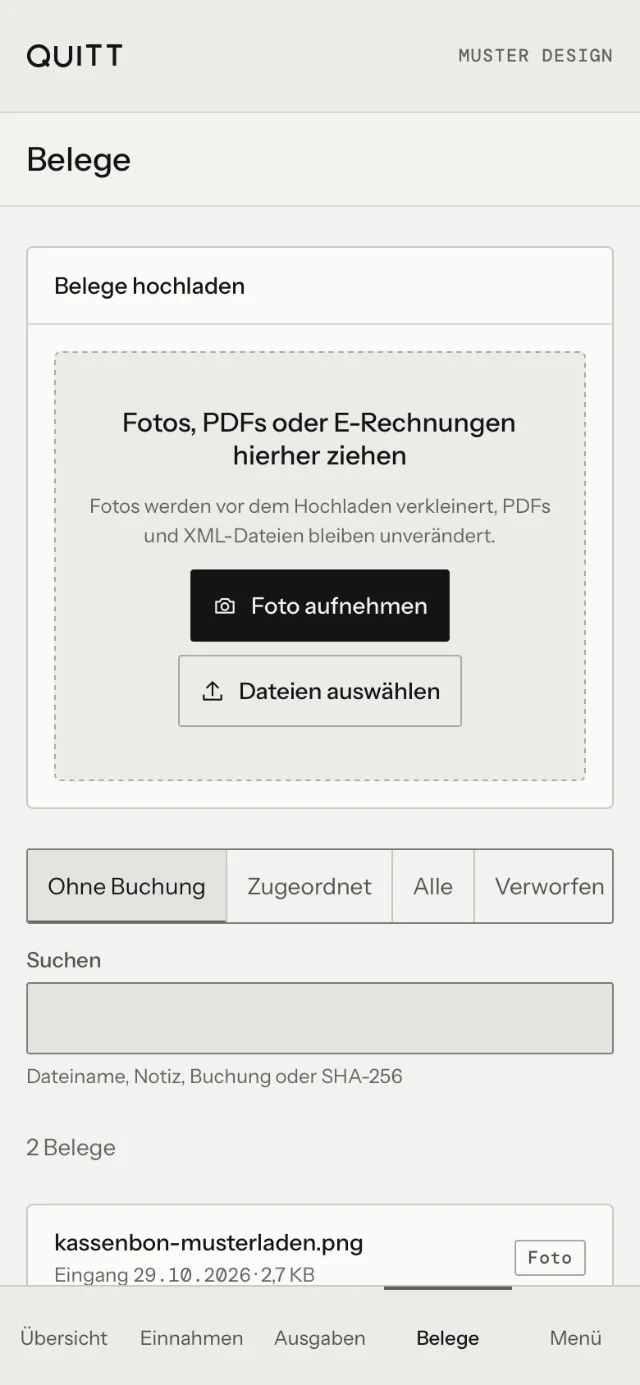
iPhone format · 390 px · demo data · German version - Year
- 2026
- Type
- Own project
Starting point
In small businesses, the bookkeeping is often scattered: receipts in emails and photo folders, invoices in a word processor, bank statements as files and the figures for the tax return in a spreadsheet. At the end of the year, everything has to be gathered and typed into ELSTER.
Approach
Quitt keeps everything in one place. Receipts arrive in the inbox as a photo, PDF or e-invoice and are matched to an entry. Quitt reads e-invoices itself; on request it reads other receipts via the OpenAI API, and you check the fields before posting. You match bank statement transactions to entries, and payments link invoices to income. The report shows the amounts line by line as in the Anlage EÜR, ready to copy into ELSTER. Behind the React interface is a custom Node.js server with SQLite on a rented Linux server behind Cloudflare Tunnel.
Security
- Passwords are stored only as scrypt hashes and compared in constant time (
timingSafeEqual). - Every account signs in with a second factor, a code from an authenticator app.
- Every database query is bound to one client. Automated tests check that a client never sees another client’s data.
- Posted entries and issued invoices stay unchanged; corrections are made by reversal. Every receipt carries a checksum (SHA-256).
- The Content Security Policy only allows scripts and styles from its own server, without
unsafe-inline.
StrideNow Coming soon
Own projectiPhone and Apple Watch app · 2026iPhone and Apple Watch app2026Own projectOwn project. Not a client commission.
StrideNow is LUNEV Software’s own iPhone app for iOS 26.1 and later. It tracks calories and macros, adds foods by barcode scan with data from Open Food Facts, and logs workouts with sets and history. It also estimates meals from a photo or text: you photograph a meal, choose a photo or describe it briefly, an AI estimates its calories and macros, and you check them before saving. It comes with an Apple Watch app, widgets and Siri. The app isn’t available yet and is coming soon.
Result
Not measured yet. Values will appear here only after a documented measurement.
Screenshots
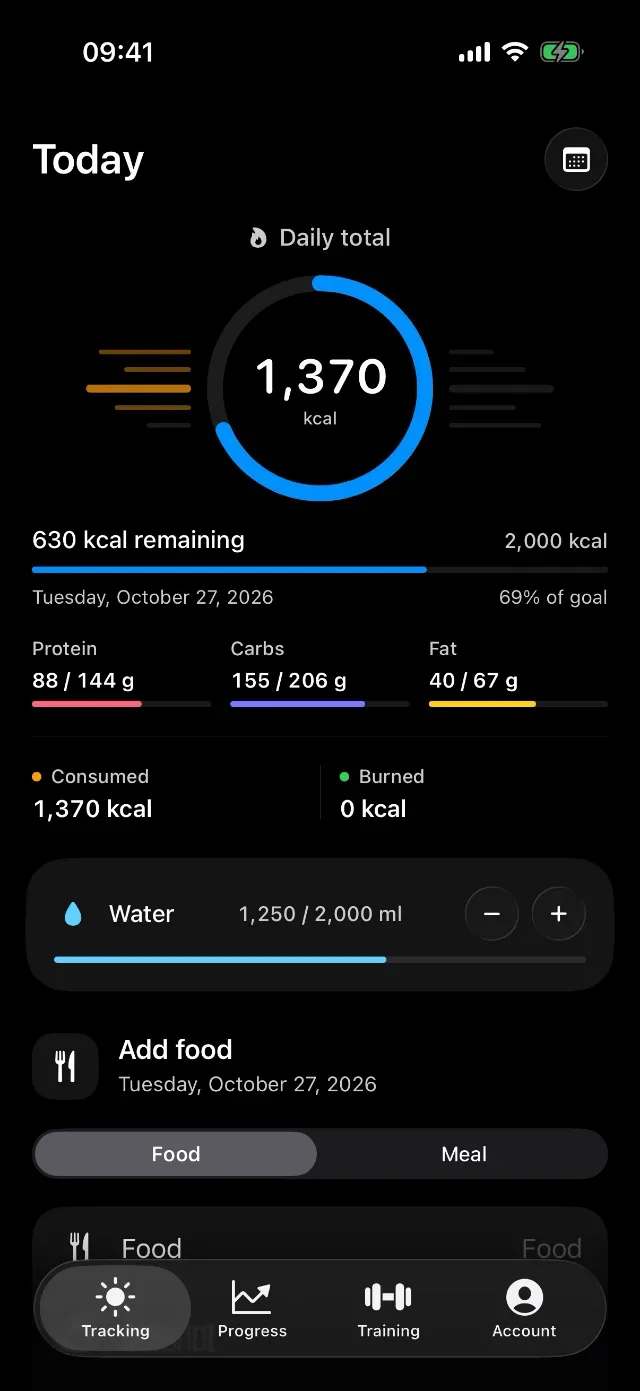
Today · iPhone · demo data 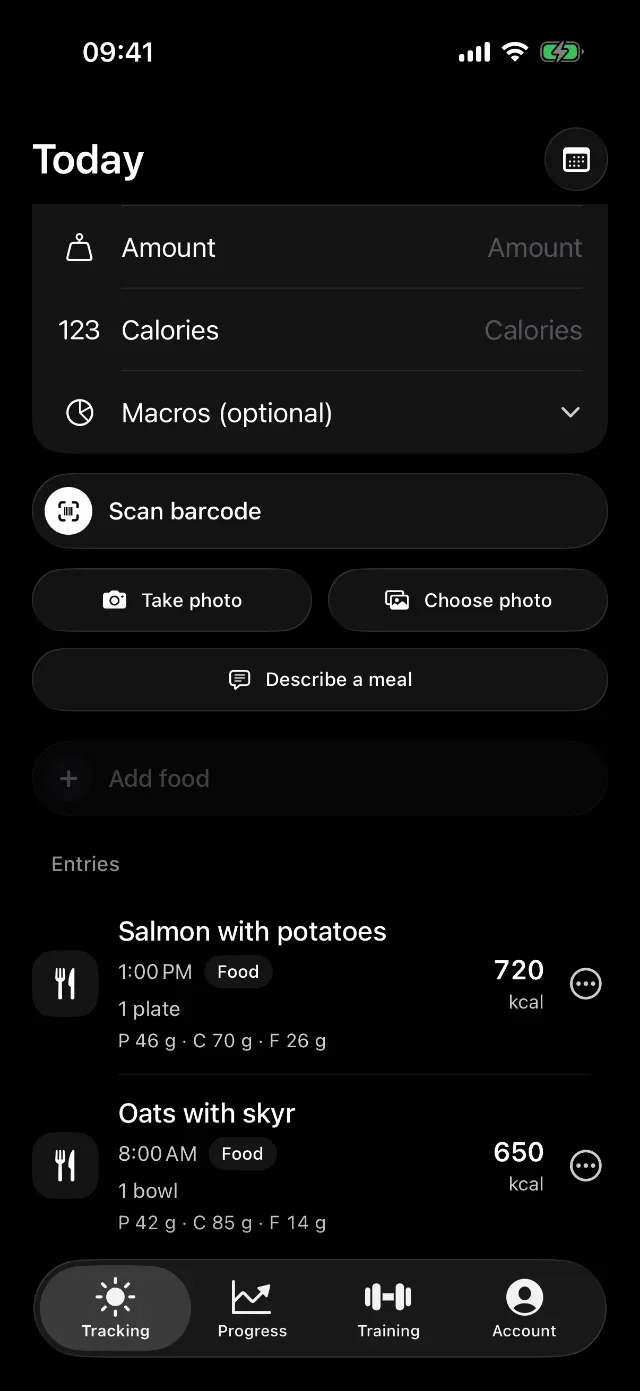
Entries · iPhone · demo data 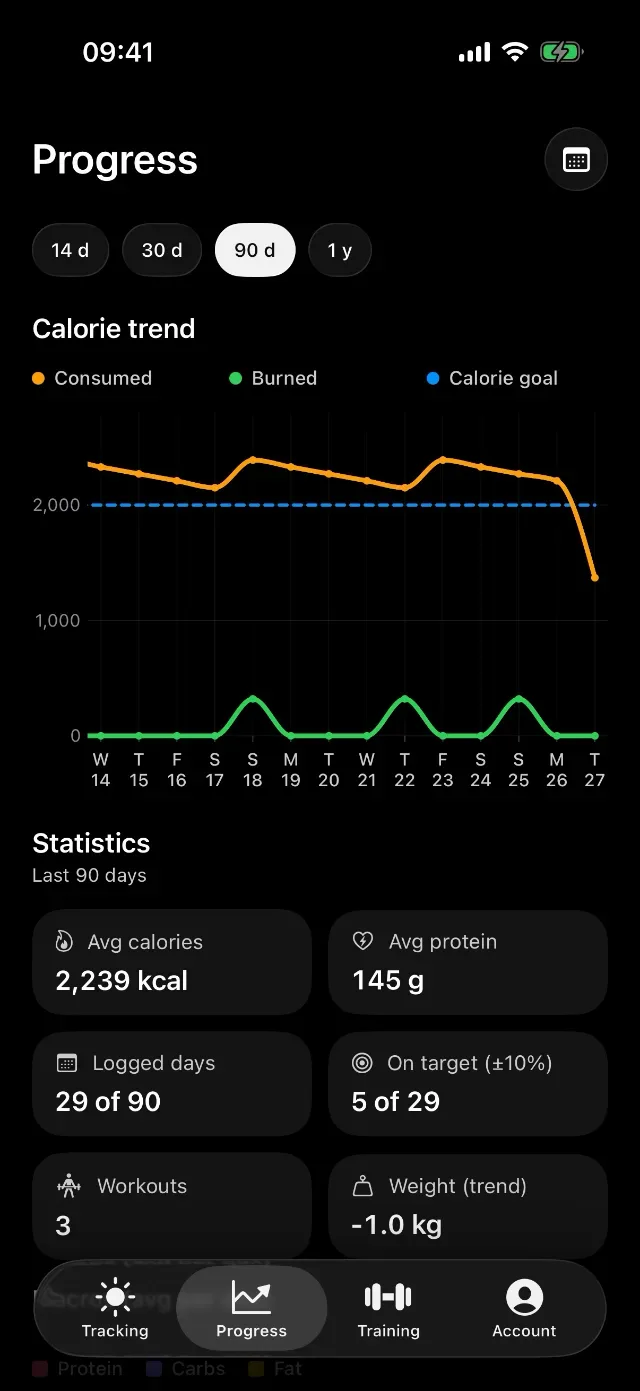
Progress · iPhone · demo data 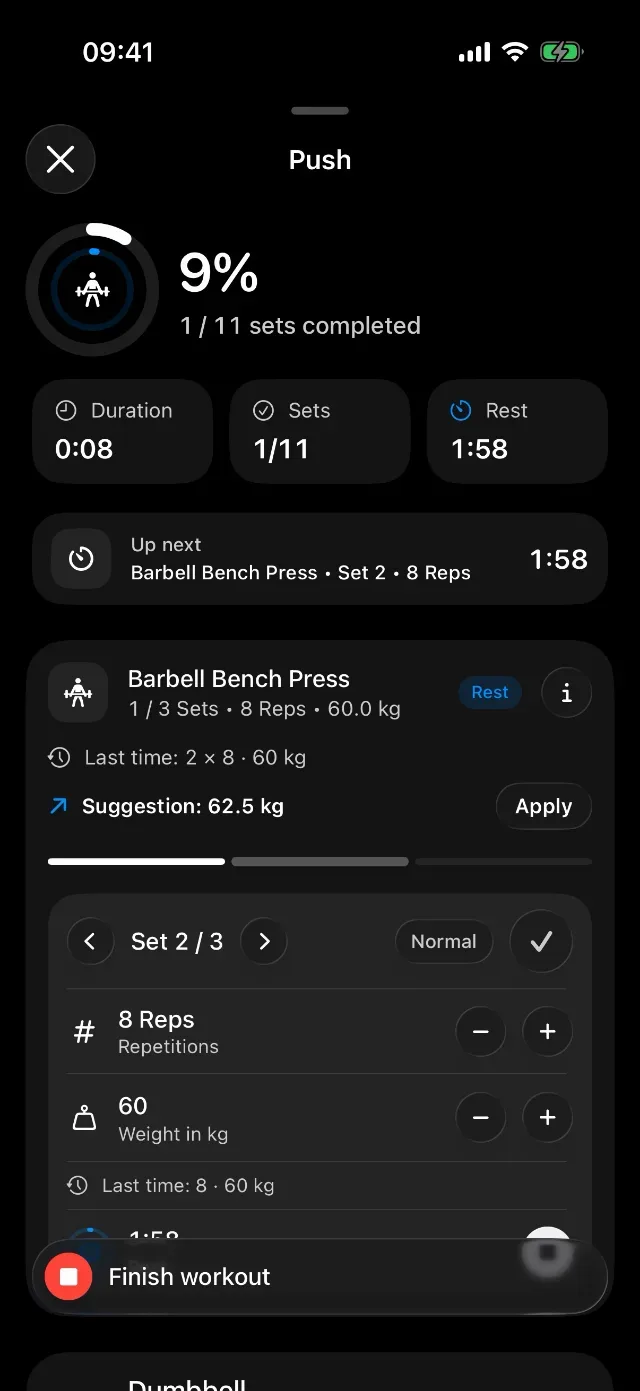
Workout · iPhone · demo data 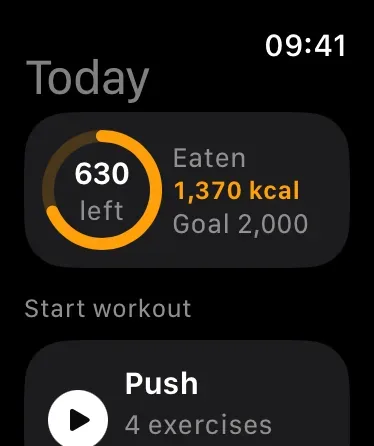
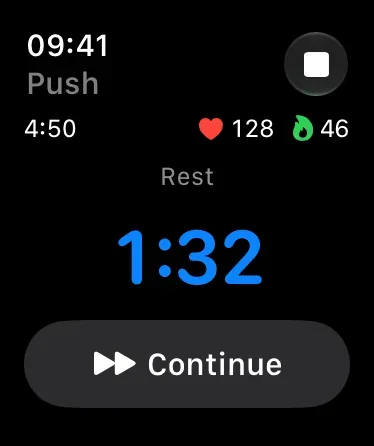
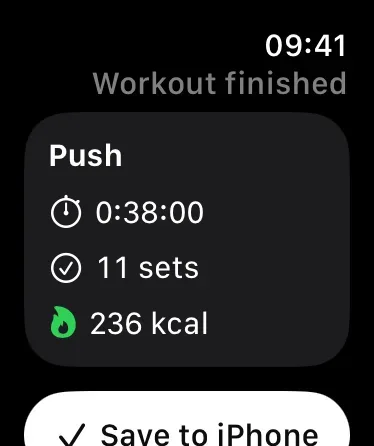
Apple Watch · demo data - Year
- 2026
- Type
- Own project
- Status
- Coming soon
Starting point
Anyone who keeps an eye on nutrition and training often keeps two lists: one for meals, one for workouts. Entering nutrition facts by hand takes time, and at the next workout the numbers from last time are missing.
Approach
StrideNow brings both into one app. A barcode scan adds foods with their nutrition facts from Open Food Facts, and the day view shows calories and macros next to your goal. Steps and workouts from Apple Health count toward the calories burned. During a workout, every set shows the numbers from last time, and history and personal bests are kept. Widgets show your day on the Home Screen and Lock Screen, Siri lets you log water or start a workout, for example, and the Apple Watch follows the workout on your wrist.
This website
Own projectWebsite and design system · 2026Website and design system2026Own projectOwn project. Not a client commission.
LUNEV Software needs a website that shows how the studio works. So it’s built like a product: with fixed rules for design and content, full keyboard support, a calm version for anyone who prefers little motion, and limits for load time.
Result
- Loads quickly: in the measurement on a computer the main content is there after 0.6 seconds.
- Works on a phone just as well as on a big screen.
- No tracking and no analytics tools; the fonts come from the site’s own server.
- Bilingual: German and English with the same content.
- Fully usable by keyboard, with a calm version for anyone who prefers little motion.
Technical measurements
- Lighthouse 12.8.2 mobile (default profile: simulated slow 4G, 4× CPU throttling), median of three runs on 1 October 2026, Node build on the development machine: Performance 95, LCP 2.9 s, CLS 0, TBT 0 ms.
- Desktop, same setup: Performance 100, LCP 0.6 s, CLS 0, TBT 0 ms.
- Initial JavaScript of the home page according to the build: 150 KB gzip, limit 170 KB.
- Year
- 2026
- Type
- Own project
Starting point
A studio without public client work has to prove its care some other way. A page full of claims and stock photos would prove the opposite.
Approach
The website is the proof itself: it measures its own interface, discloses its rules and can be operated by keyboard, command palette and terminal. Its numbers are measured, counted or read out when the site is built. Where a measurement is missing, no number is shown.
Experiments live in the workbench.
Client projects only appear here with the client’s explicit consent. Consent can be withdrawn at any time, and the project then comes off the site.
Technology26 entries
What LUNEV Software builds with
Technologies LUNEV Software works with, plus the standards for managing content and taking payments. Each entry says what it is used for; where it’s at work on this website, the entry names the place.
FAQ20 questions
Questions before a project
What does LUNEV Software build?
Websites, web applications, iPhone apps and custom software, from the first sketch to launch. What runs behind the scenes, such as servers, online payments and links to other programs, is part of it too. If a project isn’t a good fit, LUNEV Software will tell you in the first call.
Who plans and builds my project?
LUNEV Software itself, a studio for websites, web applications and apps in Cologne. Design and programming happen under one roof, with no handover between the commitment and the work.
Does LUNEV Software only work in Cologne?
LUNEV Software is based in Cologne and works for businesses in Cologne and the surrounding area, and remotely beyond that. Conversations and projects can be in German or English.
Does the first call cost anything?
No. The first call is free and without obligation.
How does a project start?
With a conversation about your plans, your users and your constraints. Afterwards you receive a written quote covering scope and open questions. Once it’s right for you, you first see a clickable draft, included in the quote, and base your decisions on it before any code is written. The build then proceeds in stages with versions you can review.
What does a project cost?
The basis is an hourly rate of €75 (final price, no VAT under the German small business rule, § 19 UStG). After the first call you receive a written quote with a fixed price for your project.
How long does a project take?
That depends on the scope. The schedule is part of the quote, so you know where you stand before work begins.
Do I get the source code?
Yes. Once you have paid in full, you receive the source code and all rights of use to the code written for you. Open-source libraries used in it remain under their own licences.
Whose name are the domain, server and accounts in?
Yours. LUNEV Software sets up the domain, server, payment or App Store account and works in them with its own login. If you switch providers later, everything stays with you.
What happens if I want to switch providers later?
You take everything with you: once you have paid in full, the source code and rights of use are yours, the accounts are in your name, and the handover includes instructions for operation and further development. That way someone else can carry on.
Do you also take care of hosting and maintenance?
Yes, on request. Operation, hosting and further development are agreed separately, with scope and price set out in the quote. The accounts involved are in your name.
What is it like to work with LUNEV Software?
Direct: whoever designs your product also builds it. Instead of status reports, you see working builds and decide based on them what comes next. Agreements are put in writing so they stay traceable.
Does LUNEV Software work on existing products?
Yes. The first step is a review of the code, the architecture and the metrics. From that comes a proposal for what’s worth improving and what should stay as it is. Only what can’t sensibly be saved any other way is rewritten.
Can I see any projects yet?
Yes. LUNEV Software is new, so the first projects are its own: Trade Studio runs at trade-studio.de, the bookkeeping app Quitt at quitt.lunev-software.de, and StrideNow is coming soon. There are no publicly shown client projects yet. Trade Studio and Quitt have their own project pages with screenshots, and accounts for Quitt are available on request. This website also shows how LUNEV Software works.
Which industries does LUNEV Software work for?
There is no fixed industry. LUNEV Software works for small and medium-sized businesses and the self-employed; how a website or app looks depends on your industry and on what it’s for.
Which technologies does LUNEV Software use?
On the web mainly TypeScript with React and Next.js or Vue 3, on the backend Node.js with SQLite, and Swift and SwiftUI for iOS. For content you maintain yourself, Payload CMS is the standard, and Stripe for payments. The choice depends on your project and on what’s already in place. The technology section above explains what each tool is used for.
Which CMS do you work with?
The standard is Payload CMS. It lets you maintain content such as a blog, news or events yourself without touching code, and it runs directly inside Next.js. If you already use a different system, LUNEV Software will learn its way around it. More in the guide Payload CMS for small websites.
How important is load time?
Important enough to plan for from the start: limits, for load time and data size for example, are set early and measured against rather than hoping for the best at the end. LUNEV Software only quotes numbers that have been measured, and that includes this site. You can measure a website with the website check.
How secure is my data?
Security is planned in from the start: encrypted connections, only the data that is needed, protected access and regular backups. The quote sets out which of these your project needs.
How secure are payments on my site?
Card details travel encrypted from your customer’s browser straight to the payment provider, in isolated fields your site cannot access. Neither your server nor LUNEV Software ever sees them. The provider handles confirmation in the banking app (3-D Secure). An order only counts as paid once the provider confirms it to your server and the server has verified this with the provider. More on the page Online payments with Stripe or Mollie.
Workbench2 experiments and a terminal
For the curious: the workbench
A bench of small tools. Each experiment measures or moves something and shows you the real values behind it.
ContactSending directly from this form
Build something that holds up?
Briefly describe what you have in mind. You’ll receive a reply within two business days, with a suggested date for a free, no-obligation first call.
Received. A confirmation of receipt is on its way to you by email. You’ll receive a reply within two business days, with a suggested date for a free, no-obligation first call.Received. You’ll receive a reply within two business days, with a suggested date for a free, no-obligation first call.
Without JavaScript, write directly to contact@lunev-software.de.
The form could not be loaded just now. Write directly to contact@lunev-software.de or reload the page.
Direct
- contact@lunev-software.deCopiedCopying isn’t possible here. Please select the text manually.
- Phone
- +49 176 24127529